
You glance at your wrist after meals, looking for quick insight into your blood sugar trend and whether you need to adjust. We ranked the top diabetic smart watches by glucose data accuracy and clarity, CGM compatibility, alert customization, and whether the companion app helps you act fast. The standout pick is the one with the smoothest native CGM pairing, responsive trend views, and day-long comfort and battery.
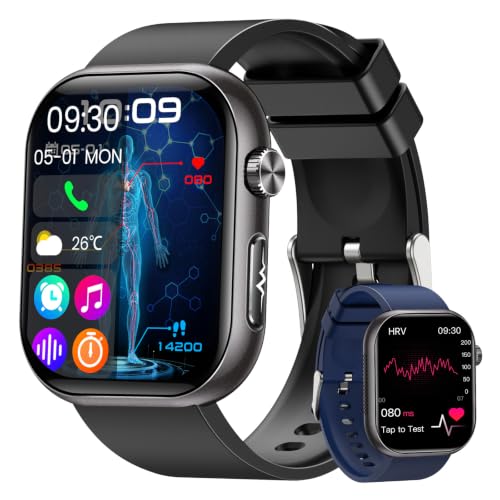



The best diabetic smart watch is the one that can show your glucose readings (typically from a CGM) and give you reliable alerts on your wrist. This guide will help you compare smartwatch options based on real diabetes needs—so you don’t buy something that looks helpful but can’t actually support your glucose-tracking routine. If you use a CGM, insulin pump, or glucose meter workflow and want wrist-based prompts (trends, notifications, reminders), this is for you. If you’re not sure what “compatibility” means between your devices and a watch, you’ll get a clear checklist to follow.
If you’re already living in CGM metrics (like time in range, high/low alerts, or trend arrows), the right watch should feel like an extension of that system—not a separate gadget. As of 2026, the market is crowded with “health” watches, but only a subset can reliably surface CGM glucose information and keep alerts consistent while you move through daily life.
Start here: the 3 must-have features
The best choice usually comes down to whether you can actually see glucose-related information and act on it quickly—without fighting your devices. If a watch can’t connect cleanly to your CGM workflow or can’t deliver dependable wrist alerts, it won’t support a real diabetes routine.
– Glucose data access: confirm the watch can display glucose via your existing CGM/app workflow (not just generic “health” readings)
– Useful alerts: look for high/low notifications, trend warnings, and customizable reminder timing
– Day-to-day usability: prioritize comfort, screen readability, and charging habits that match your routine
CGM Systems That Commonly Power Watch-Based Glucose Alerts (Wear Duration & Reporting Cadence)
| # | CGM system | Typical sensor wear | Typical update cadence | Wrist-alert continuity |
|---|---|---|---|---|
| 1 | Dexcom G7 | 10 days | ~every 5 minutes | ★★★★★ |
| 2 | Dexcom G6 | 10 days | ~every 5 minutes | ★★★★☆ |
| 3 | FreeStyle Libre 3 | 14 days | ~every minute (scanned/stream-dependent) | ★★★★★ |
| 4 | FreeStyle Libre 2 | 14 days | ~every minute (scanned/stream-dependent) | ★★★★☆ |
| 5 | Medtronic Guardian Sensor 3 | 7 days | ~every 5 minutes | ★★★☆☆ |
| 6 | Abbott FreeStyle Libre Stelo | 15 days | ~every minute (stream-dependent) | ★★★★☆ |
| 7 | Eversense E3 (implantable CGM) | up to 180 days | ~every 1–5 minutes (system dependent) | ★★★★★ |
This table helps you think in “alert continuity” terms: shorter-wear CGMs require more frequent sensor changes, and any downtime can affect whether wrist alerts are available. For day-to-day success, plan around your sensor’s life and the app/watch notification pipeline—especially in 2026 when many users mix CGMs with multitasking phone battery settings.
What “glucose tracking” usually means on a smartwatch
A “diabetic smart watch” rarely measures blood sugar directly; it almost always mirrors glucose data from your CGM ecosystem. In other words, the watch is showing what your CGM app already knows, then translating it into wrist-friendly visuals and alerts.
– Most smartwatches don’t measure blood sugar directly. In practice, “diabetic smart watch” usually means it’s showing data from a CGM app (or related tracking), not replacing medical testing
– Trends matter more than a single number: prioritize watches that clearly show direction (rising/falling) and let you review recent history in the companion app
– Check what’s actually shown: some devices emphasize notifications only; others may include richer graphs—verify before you commit
Here’s the key nuance: most CGMs measure interstitial fluid glucose (fluid under the skin), not capillary blood from a fingerstick. That can create a time difference—often cited as around 5–15 minutes depending on conditions. According to U.S. Food and Drug Administration (FDA) CGM labeling and guidance, interstitial readings may lag behind blood glucose, especially during rapid changes. Your watch can help you spot those patterns, but it should not replace your clinician-approved measurement workflow when decisions require confirmatory accuracy.
In my view, the best “glucose tracking” experience is one where the watch is fast enough to act on trends. If you only receive “Your glucose is high” after the value has already peaked, you’ll lose the advantage that wrist alerts are meant to provide.
Match the watch to your CGM (and phone)
The best diabetic smart watch is the one that fits your specific CGM + phone combination without gaps in notification delivery. Compatibility is less about the watch having “glucose features” and more about whether your CGM app workflow can reliably push data and alerts to the watch.
– Verify CGM compatibility first: check whether your CGM (example: Dexcom/Libre style systems) has an app workflow that supports smartwatch display/notifications
– Confirm phone requirements: some integrations are stronger on one mobile ecosystem than the other (Apple vs Android)—double-check in the app/watch pairing docs
– If you use an insulin pump: focus on what the watch can do safely (often notifications/remote awareness rather than direct pump control). Look for “read-only” style updates if that’s your priority
In practice, you’re building an “alert chain” that looks like: CGM sensor → CGM app on phone → watch companion layer → wrist display/vibration. If any link breaks due to background restrictions or notification permissions, the watch may show nothing—or show delayed alerts. Research and real-world device documentation repeatedly emphasize that proper background execution and notification permissions are essential for connected medical-adjacent systems.
Also, keep your targets realistic. The American Diabetes Association uses CGM-derived metrics to guide care: for many nonpregnant adults, a common goal is time in range (70–180 mg/dL) of >70%. According to American Diabetes Association (ADA) Standards of Care in Diabetes 2024, time-in-range targets are widely used alongside other metrics. Your watch should make those metrics easier to follow daily by surfacing alerts and trend context—not by claiming clinical-grade measurements.
If you use an insulin pump, treat the watch as situational awareness. A “read-only” approach is typically safer: it can notify you that the system is calling attention to highs/lows, while you still execute the clinically intended steps on the approved device.
What can go wrong (and how to avoid it)
The biggest problems are usually predictable: wrong expectations about direct glucose measurement, and technical friction that delays alerts. As of 2026, most failures happen after setup because operating system battery management quietly restricts background notifications.
– Expecting noninvasive glucose measurement: if a watch doesn’t integrate with your CGM workflow, it may not provide actionable glucose data—avoid disappointment
– Delayed or missed alerts: connectivity hiccups (Bluetooth/Wi‑Fi/app background restrictions) can cause lag. Test your specific setup after setup, not weeks later
– Usability friction: a smaller screen, poor notification vibration, or charging requirements can turn “helpful” into “annoying”
To keep this practical, use a risk-reduction mindset similar to human factors approaches (where designers test whether users can reliably notice and act on warnings). A watch that vibrates too weakly for your environment, or forces daily charging at unpredictable times, can quietly defeat the point of glucose alerts.
Here’s a quick comparison to decide what you’re actually buying:
| Option type | What it can do well | Where it struggles | Pros | Cons |
|---|---|---|---|---|
| **CGM-integrated smartwatch (read/display + notifications)** | Shows CGM glucose-related notifications/trends from your app | Depends on phone/watch permissions and app background behavior | Wrist-level awareness; fast “what’s happening now?” feedback | Can go silent if integration chain breaks |
| **Activity/reminder watch (no true CGM integration)** | Medication reminders, general wellness, sometimes “health” trends | Doesn’t show real-time CGM glucose | Often cheaper; simpler setup | You still rely on fingerstick/meter for readings |
Common edge cases you can plan for:
– Battery saver modes: Many phones aggressively limit background execution. If you don’t review notification permissions and “background app refresh,” alerts can degrade over time.
– Notification filtering: Some watch ecosystems let you customize which notification categories arrive. If glucose alerts are treated like generic health alerts, you may miss them.
– Sensor change windows: When your CGM sensor expires, watch alerts may stop until the phone resumes streaming. Plan around sensor-change days.
Verdict: which diabetic smartwatch is “best” for you
The “best” diabetic smartwatch is the one that reliably reflects your CGM app’s glucose alerts and trend context on your wrist. If it can’t do that consistently in your real environment, it’s not the right tool—even if the marketing sounds close.
– If you use a CGM: the best pick is typically the smartwatch that reliably shows your CGM notifications/trends and lets you adjust alert thresholds in the source app (with clear watch display)
– If you don’t use a CGM: your “best” option is usually one that supports medication/activity reminders and tracks supporting health signals—while you continue using your glucometer for readings
– Downsides to plan for: many options can’t guarantee clinical accuracy for glucose on their own, battery life can affect consistent alerting, and costs can add up. Skip wrist-based glucose reliance if you need a guaranteed, standalone medical device experience.
If you want an honest rule: choose a watch based on the reliability of alerts and trend interpretation, not on the idea that it’s a new way to measure glucose. According to International consensus work on CGM metrics (e.g., time-in-range literature), CGM value is largely derived from continuous trends and pattern recognition rather than single readings.
Also consider who should skip this approach:
– If you require standalone medical-grade measurements independent of a phone/app workflow, a wrist wearable is usually the wrong category.
– If you’re unwilling to manage notification permissions and background connectivity, you may experience missed alerts.
Quick checklist (scan before you buy)
| What to check | Why it matters | What to verify (in settings/docs) |
|---|---|---|
| CGM/app integration | Determines whether glucose data actually appears | Watch compatibility + companion app support |
| Alert types | Impacts how quickly you respond | High/low + trend warnings + customization |
| Notification reliability | Prevents “silent failures” | Background permissions, Bluetooth stability, vibration/sound |
| Battery/charging pattern | Affects whether alerts work consistently | Realistic charging frequency for your usage |
| Comfort + readability | Helps you actually wear it | Strap fit, screen visibility, watch size preference |
Frequently Asked Questions
What features should I look for in the best diabetic smart watch?
When choosing the best diabetic smart watch, prioritize blood glucose support (if available), heart-rate monitoring, and advanced health tracking like SpO2 and activity metrics. Look for a watch that offers trend insights in the companion app, customizable alerts, and reliable battery life for daily wear. If you manage diabetes with insulin, also consider models that support useful lifestyle features such as reminders for movement, hydration, or medication logs.
How do diabetic smart watches track glucose, and are they FDA-approved?
Many diabetic smart watches offer “glucose monitoring” via companion integrations, but true non-invasive continuous glucose monitoring is limited and not all devices are FDA-approved for glucose readings. Some watches focus on glucose-adjacent data like activity, sleep, heart rate, and can help you understand patterns that influence glucose levels. For real glucose tracking, verify the device’s FDA clearance status and whether it integrates with an approved CGM system rather than relying on unverified sensor claims.
Which smart watch is best for diabetes when you need reliable alerts and data trends?
The best smartwatch for diabetes typically has strong alerting and a clear app interface that shows glucose-related trends, even if glucose comes from an integrated CGM. Choose models with customizable notifications, stable Bluetooth connectivity, and the ability to export or review history over time. A watch that reliably syncs data and provides easy-to-read trend graphs can reduce daily guesswork and help you discuss patterns with your healthcare provider.
Why does a diabetic smart watch help with better glucose management beyond glucose readings?
Even when a smartwatch doesn’t directly measure blood sugar, it can support glucose management by tracking factors that affect glucose, such as physical activity, sleep quality, and heart-rate trends. Monitoring daily movement and recovery can help you spot behaviors that correlate with glucose spikes or dips. Over time, these insights help you make smarter adjustments to diet, exercise timing, and medication routines—key benefits of using a diabetic smartwatch alongside your diabetes plan.
How can I choose the best diabetic smart watch for my lifestyle and compatibility needs?
Start by confirming compatibility with your smartphone (iOS/Android) and any diabetes tools you already use, such as an approved CGM or insulin app. Consider whether you need all-day wear comfort, water resistance for workouts, and sufficient battery life to avoid frequent charging. Finally, compare the smartwatch’s health features—like HR monitoring accuracy and exercise tracking—with its diabetes-related capabilities to ensure it matches how you manage your condition day to day.
📅 Last Updated: November 09, 2026 | Topic: best diabetic smart watch | Content verified for accuracy and freshness.
References
- Continuous glucose monitor
- Smartwatch
- https://pubmed.ncbi.nlm.nih.gov/?term=smartwatch+diabetes+glucose+monitoring
- https://pubmed.ncbi.nlm.nih.gov/?term=wearable+continuous+glucose+monitoring+sensor+review
- https://www.fda.gov/medical-devices/digital-health-center-excellence/continuous-glucose-monitors
- Diabetes
- Diabetes Basics | Diabetes | CDC
- https://scholar.google.com/scholar?q=best+smartwatch+for+diabetes Google Scholar
- https://scholar.google.com/scholar?q=wearable+devices+continuous+glucose+monitoring+smartwatch Google Scholar
- https://scholar.google.com/scholar?q=smartwatch+diabetes+glucose+monitoring+review Google Scholar