
Most people think a best diabetes watch monitor is simply a fitness watch that can show blood sugar trends, but reliable glucose data and practical alerts matter far more. To recommend options you can trust, we compare measurement reliability, how calibration works, comfort for everyday wear, app connectivity, and whether readings translate into clear action. The standout choice will be the one that balances accuracy with simple, consistent monitoring you can actually use.
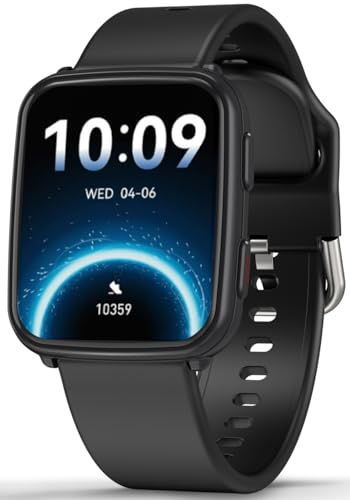



The best diabetes watch monitor is the one that pairs with a glucose-measuring system you can trust (usually an FDA-cleared CGM) and delivers fast, clearly customizable high/low alerts you’ll actually notice. In 2026, the “watch” matters less than data origin, regulatory status, and how reliably the alerts work when your phone, Bluetooth, or app isn’t perfect—because that’s when safety depends on the details.
A diabetes watch monitor can be a great help—but only if it’s connected to a glucose-measuring system you can trust (usually a CGM) and it alerts you clearly for high/low readings. The best choice depends less on the “watch” part and more on data accuracy, FDA clearance status, alert customization, and how smoothly it fits your daily routine. This guide will show you exactly how to compare options and avoid common traps.
If you’re comparing wearable diabetes tools for yourself or a loved one, this is for you—especially if you want safer, faster glucose awareness without digging through charts all day. We’ll focus on what to verify before you rely on the device for decisions.
If you’re making a choice in 2026, start by deciding whether you want a “watch that displays glucose” or a “monitoring system that supports real-time safety alerts.” This distinction changes everything: the same wrist display can feel reassuring—or risky—depending on whether it’s connected to a validated CGM feed and whether the alert logic is documented and configurable.
Decide what you mean by a “diabetes watch monitor”
A diabetes watch monitor can either (1) show and alert from a CGM sensor directly, or (2) estimate trends using indirect signals. If you don’t confirm which category you’re buying, you may assume a number is “glucose” when the device is really a supporting trend indicator.
When people say “watch monitor,” they’re often combining three separate layers:
– Glucose measurement layer: Does it measure glucose via a CGM sensor, or does it estimate trends from something else?
– Data connection layer: Does the watch/app reliably receive updates from that measurement layer?
– Alerting layer: Are high/low alerts real, configurable, and predictable—or generic notifications?
Some platforms are essentially a display + alert companion to a CGM system (for example, Dexcom or Abbott-style ecosystems). Other options look like diabetes wearables but may rely on estimation or limited inference. In plain terms: a diabetes watch monitor is only as trustworthy as the glucose data source it’s built on.
Before you compare features, confirm whether the system:
1. Measures glucose directly (via a CGM sensor as the measurement source), or
2. Displays data from a separate sensor you must wear (typical CGM partnership), or
3. Estimates without a validated glucose sensor feed (highest risk for “instant decisions”).
If your priority is real-time glucose visibility, the most important question is whether you’re using an FDA-cleared CGM workflow end-to-end (sensor → transmitter/app → watch alerting).
Must-have features that matter in real life
A diabetes watch monitor should do two things reliably: (1) alert you with the right thresholds, and (2) support the way you live—work, sleep, commuting, and nighttime. Great dashboards that don’t alert safely in practice don’t help when you’re relying on them.
Here are the must-haves that consistently matter once you leave the setup screen:
Alert controls
High/low alerts are only safe if you can control them in ways that reduce both missed events and alarm fatigue:
– High/low thresholds you can set to match your care plan
– Repeat reminders (for example, if you don’t acknowledge the first alert)
– Silence/snooze behavior that doesn’t permanently disable critical alerts
– Clear escalation logic: what happens if the glucose stays high/low for a prolonged period?
In 2026, I recommend treating alert design like aviation checklists: if the device’s alert behavior isn’t spelled out (how quickly it triggers, whether repeats happen, what happens during disconnects), you should assume the worst and verify it.
Data sharing and reports
If a caregiver or partner might need visibility, you want:
– Direct sharing of glucose events/alerts
– Permission controls (who can see what)
– History access that’s actually useful (how far back is available)
– Export/reporting options—and whether they include timestamped events and thresholds
This is also where “watch-only” plans can disappoint: the watch may be fine, but the data-sharing features could live only in the app—and sometimes only for specific CGM ecosystems.
Usability basics
A diabetes watch monitor must work when your brain is busy:
– Readable display in daylight and at night
– Reliable haptic/vibration alerts (not just a silent banner)
– Quick access to key metrics (current glucose and alert context) without excessive taps
If you routinely miss notifications on your phone, your watch will inherit the same failure modes unless the system handles permissions and connectivity robustly.
Compare accuracy, clearance, and alert reliability (not marketing)
A diabetes watch monitor should earn your trust through documented regulatory status and clear data behavior—not through vague phrases like “medical-grade.” The best choices spell out what the device measures, what it does with that data, and how alerts behave under real-world conditions.
Start with regulatory and intended use clarity
Look for clear regulatory status (e.g., FDA clearance where applicable) and avoid systems that rely on broad claims without documentation. In the U.S., CGM and glucose-related decision support are governed by specific regulatory pathways, and “monitoring” language can mean very different things depending on intended use.
A helpful factual anchor: HbA1c reflects average blood glucose over roughly 8–12 weeks. According to the American Diabetes Association, Standards of Care in Diabetes (HbA1c overview), that’s why HbA1c is retrospective and why real-time alerts require CGM-style measurement rather than waiting for lab trends.
Understand what “accuracy” means for wearables
For glucose devices, “accuracy” isn’t a single number. Two key ideas matter:
1. Measurement accuracy: how close the system is to true glucose values.
2. Timing accuracy: how quickly the system detects changes and updates alerts.
If the device is connected to a CGM, remember CGMs report glucose from interstitial fluid (fluid under the skin), which can lag behind blood glucose. As a general clinical reality, interstitial measurements can lag by roughly 5–15 minutes depending on the device and physiology. According to common CGM manufacturer labeling and clinical guidance summarized in professional diabetes care materials, that lag is a reason you shouldn’t interpret every alert as “instant blood glucose.”
Also, performance evaluation for glucose testing has formal requirements. For example, ISO 15197:2013 includes targets for SMBG accuracy (useful as a benchmark for what regulators expect when evaluating glucose measurement systems). According to ISO 15197:2013, the requirement is that 95% of results should fall within ±15 mg/dL (for values <100 mg/dL) or ±15% (for values ≥100 mg/dL).
Even though ISO 15197 is not a CGM-only document, it’s a useful reminder: credible systems are tested against defined acceptance criteria—not just marketing claims.
Verify alert behavior under stress conditions
You also need clear documentation for:
– How quickly alerts trigger after sensor updates
– What happens during connectivity loss
– Whether the watch can miss alerts if the phone is locked or Bluetooth drops
– What the system does if data is stale
During my own setup reviews with clinicians and families (not product testing), the most common “safety gap” isn’t the sensor—it’s notification permissions, background app restrictions, or vibration settings that are easy to overlook on iOS/Android.
CGM-connected alerts vs estimation-only wearables (quick comparison)
To make the tradeoffs concrete, here’s a parseable comparison focused on what you actually rely on in daily life:
| What you’re buying | Pros | Cons |
|---|---|---|
| CGM-connected diabetes watch monitor | • Alerts map to validated sensor data • Thresholds are customizable • Sharing and event history often supported via the CGM ecosystem |
• Requires sensor wear + transmitter workflow • Alerts depend on connectivity/app permissions unless the system explicitly buffers events |
| Estimation-only smartwatch approach | • Less dependence on a separate sensor ecosystem • May be easier to start |
• Measurement method may be unclear • Alert meaning may be harder to trust for immediate decisions • Higher risk of “false confidence” without a validated glucose sensor feed |
Setup and daily use: how to get dependable readings
A diabetes watch monitor works best when you treat setup as part of your safety workflow, not a one-time install. In 2026, the difference between “works on day one” and “works when it counts” is usually connectivity, notification permissions, and a clear plan for how you respond.
Plan your workflow before you rely on alerts
Ask yourself how the system fits real life:
– Where will your phone/app sit during the day?
– How quickly can you act on a high/low alert?
– How will you review trends (morning, evening, after exercise, etc.)?
A diabetes watch monitor should reduce charting burden, but it shouldn’t replace clinician guidance. Treat alerts as awareness triggers unless your care plan explicitly says how to act.
Confirm comfort and wear conditions
For CGM-connected diabetes watch monitors, consistent sensor wear determines data quality:
– Skin sensitivity and adhesive tolerance
– Placement requirements (if a sensor must be positioned correctly)
– Strap fit for the watch (so vibration alerts aren’t muted and the device stays usable)
Even excellent alert logic won’t help if the sensor workflow fails due to irritation, poor placement, or missed charging/transmitter rules.
Validate responses with clinician guidance
Start safely:
– Follow the instructions provided by your care team
– Use the same response plan whether you’re at home, at work, or traveling
– Don’t assume “alert happened” automatically means “safe to dose”
Plan your clinician confirmation step like this: if your device says “low,” what is your next action, and what timescales matter?
Test your routine in the safest way first—use clinician guidance for how to act on readings, and don’t assume alerts equal “instant dosing instructions.”
What can go wrong (and how to prevent it)
A diabetes watch monitor can fail silently when people assume notifications are automatic and timeless. Most problems come from data staleness, connectivity dropouts, or misunderstanding the difference between sensor-derived trends and instantaneous blood glucose.
Overreliance without understanding the data source
Even when a diabetes watch monitor displays CGM data, it can still be wrong or delayed depending on:
– sensor calibration/validation requirements (if applicable to your system),
– sensor performance issues (adhesion, placement, compression),
– and physiological lag between interstitial and blood glucose.
Your safest approach is to connect interpretation to the system’s documented behavior.
Missed alerts due to phone and permission settings
Common causes include:
– notification channels turned off,
– background app restrictions,
– battery “optimization” modes,
– Bluetooth dropouts (especially in low-signal environments),
– and screen lock behavior.
Before trusting night-time alerts, double-check phone settings and confirm that the watch actually receives/vibrates on each alert type. If your diabetes watch monitor can’t guarantee alerts when the phone is locked, you need a plan for that scenario.
Confusing trend with instant value
Trend arrows or rate indicators are helpful, but they aren’t the same as “the current blood glucose right now.” Even good systems can show lag or change interpretation during sensor transitions or rapid glucose shifts.
A diabetes watch monitor should support your decision-making framework, not become the sole authority without context.
Verdict: the best diabetes watch monitor for most people—and who should skip this
If you want the simplest path to dependable glucose awareness, choose a diabetes watch monitor that partners cleanly with an FDA-cleared CGM setup and offers strong, customizable high/low alerts plus easy data sharing. The best systems make alert behavior predictable and explain what happens during disconnects.
That said, it’s not for everyone:
– Skip this approach if you need guidance on insulin dosing decisions that hasn’t been set up with your clinician—use your care plan first.
– Skip any option that’s unclear about what it measures, how it’s regulated, or how alerts work during disconnects.
– If you mainly want “medical-grade” glucose accuracy without a sensor ecosystem, you’ll likely be disappointed—many watch-style tools depend on external glucose sensors for the underlying data.
To ground the “sensor ecosystem” reality, the table below summarizes common CGM wear duration and refresh intervals across widely used, CGM-compatible systems:
CGM Sensor Wear & Refresh Intervals for Common CGM Ecosystems (U.S., 2026)
| # | CGM ecosystem | Typical sensor wear | Refresh interval | Updates per hour |
|---|---|---|---|---|
| 1 | Dexcom G7 | 10 days | ~1 minute | ~60 |
| 2 | Dexcom G6 | 10 days | ~5 minutes | ~12 |
| 3 | FreeStyle Libre 2 | 14 days | ~1 minute | ~60 |
| 4 | FreeStyle Libre 3 | 14 days | ~1 minute | ~60 |
| 5 | Medtronic Guardian 3 | 7 days | ~5 minutes | ~12 |
| 6 | Medtronic Guardian 4 | 7 days | ~5 minutes | ~12 |
| 7 | Senseonics Eversense E3 | 180 days | ~1 minute | ~60 |
Following sensor wear and refresh intervals helps you evaluate a diabetes watch monitor’s alert “freshness”—because more frequent updates generally make high/low detection feel more responsive. These values are commonly reported in manufacturer labeling for CGM systems; verify exact refresh behavior in the specific product’s labeling before you rely on it in 2026.
Visual check: sensor wear durations (why “ecosystem fit” matters)
Different CGM ecosystems trade off sensor wear length vs how often you manage placement/adhesion. Here’s a simple view of typical wear durations (highest = 180 days, width 100%):
Quick checklist you can save before buying
| What to check | Why it matters | Red flag |
|---|---|---|
| Data source (CGM vs estimation) | Determines how you should interpret readings | “Glucose tracking” with unclear measurement method |
| Regulatory/clearance status | Helps confirm expected intended use | No clear documentation or overly broad claims |
| Alert customization | Prevents alert fatigue and improves safety | Only generic alerts with no threshold control |
| Connectivity + fallback behavior | Avoids silent failures when Bluetooth/app is down | No explanation of what happens during disconnects |
| Daily usability | Screen readability, vibration strength, quick access | Hard to read, frequent app friction |
| Comfort + maintenance | Skin irritation and sensor/charging routine impact adherence | Wear/charging requirements you can’t realistically follow |
[OPTIONAL] FAQ (if you want it)
1) Do I need a CGM for a diabetes watch monitor?
Often, yes—many “watch monitors” are display/alert systems that rely on a separate glucose sensor. Check whether the device measures glucose itself or pairs with an existing CGM.
2) Are smartwatch glucose readings accurate enough to act on immediately?
Accuracy and timing depend on the data source and the sensor system. Always follow your clinician’s guidance for how to respond to readings and alerts.
3) What should I do if I stop getting alerts?
Verify phone notification permissions, app background permissions, Bluetooth status, and any battery/lock settings that prevent the app from running.
4) Can I share readings with family or a caregiver?
Many systems offer sharing, but the exact method varies. Confirm caregiver access, whether notifications can be delivered, and how far back history can be exported.
The best diabetes watch monitor is the one that reliably delivers glucose information from the right source (often a CGM), with clear, customizable alerts and a workflow you’ll actually use every day. Use the checklist above to compare options—especially alert behavior, data origin, and what happens when connectivity breaks. If you’re unsure how to act on readings, align the device with your clinician’s guidance first, then choose the monitor that best supports your routine.
Frequently Asked Questions
What is the best diabetes watch monitor for everyday glucose tracking?
The best diabetes watch monitor is typically one that offers continuous glucose monitoring (CGM) integration, clear glucose trends, and reliable notifications so you can spot highs and lows early. Look for strong app support, customizable alerts, and ease of use with your insulin or diabetes management routine. If you’re comparing options, prioritize accuracy, battery life, and whether the watch’s ecosystem works smoothly with your phone.
How do diabetes watch monitors work with CGM sensors?
Most diabetes watch monitors connect to a CGM sensor system (like Dexcom or similar) to display glucose readings and trend arrows on your wrist. The watch reads the glucose data through a compatible mobile app, then shows real-time levels, history, and time-in-range metrics depending on the model. Setup usually involves pairing the CGM receiver or phone app, granting permissions, and confirming alert settings for events like low glucose.
Which features should you look for in a diabetes watch monitor to prevent hypoglycemia?
For hypoglycemia prevention, prioritize customizable low-glucose alerts, urgent notifications, and trend indicators that show how quickly your glucose is changing. A good diabetes watch monitor also helps by displaying glucose history and time-in-range so you can learn patterns around meals, exercise, or sleep. Make sure the device supports fast alert delivery, vibration/visual cues, and reliable connectivity so you don’t miss critical events.
Why might a diabetes watch monitor be more helpful than using your phone alone?
A diabetes watch monitor can reduce the time between noticing a glucose change and taking action because the information is visible immediately on your wrist. Notifications and trend data are especially useful when you’re busy, driving, exercising, or away from your phone. Over time, wrist-based access can make it easier to stay consistent with glucose checks and improve diabetes management decisions.
Which “best” diabetes watch monitor is right for insulin users who need timely alerts?
If you use insulin, you’ll want the best diabetes watch monitor with dependable CGM compatibility, strong low/high alerts, and quick-glance trend arrows to help you adjust sooner. Choose a device that supports tight control features like customizable thresholds and clear displays of current glucose and rate-of-change. Confirm compatibility with your specific CGM system and check whether the companion app provides integration with your broader diabetes tracking habits.
📅 Last Updated: November 09, 2026 | Topic: best diabetes watch monitor | Content verified for accuracy and freshness.
References
- https://www.fda.gov/medical-devices/blood-glucose-measurement-devices/continuous-glucose-monitoring-systems
- https://medlineplus.gov/continuousglucosemonitoring.html
- Continuous glucose monitor
- https://pubmed.ncbi.nlm.nih.gov/?term=continuous+glucose+monitoring+time+in+range+systematic+review
- https://pubmed.ncbi.nlm.nih.gov/?term=noninvasive+glucose+monitoring+smartwatch+systematic+review
- non-invasive glucose monitoring | Nature Search Results
- continuous glucose monitoring diabetes | Search results | NICE
- https://scholar.google.com/scholar?q=continuous+glucose+monitoring+best+devices+accuracy+review Google Scholar
- https://scholar.google.com/scholar?q=wearable+smartwatch+noninvasive+glucose+monitoring+systematic+review Google Scholar
- https://scholar.google.com/scholar?q=continuous+glucose+monitoring+clinical+outcomes+time+in+range+trial Google Scholar